The previous post about CA Planner ended with a promise: the first version solved collecting and categorizing transactions, and the next step was the other half, the one that started the project. This post is that half.
It is worth being explicit about the order of things. I did not build a transaction collector and then wonder what to do with it. I wanted to answer one question — what will my balance be on the 30th? — and everything else, the Open Finance integration, the categories, the local database, exists to make that question answerable. The collector came first only because you cannot project a balance you do not know.
What I actually needed
- A way to enter what repeats. Rent, school, the company card, taxes, the weekly grocery run — without retyping them every month, and without a rule engine either.
- A curve. Not a table of numbers to add up in my head: a line that starts where my balance actually is today and ends where the month ends, so a dip below zero is something I see rather than something I discover.
- A way to know whether the plan happened. The plan says the rent goes out on the 10th. Did it? For R$ 2.400, or for something else?
A plan is a forecast, not a ledger
The first decision shaped everything after it: a planned item and a bank transaction are different things and are not linked. Planning writes its own rows, syncing writes its own rows, neither touches the other. The payoff is that planning never becomes data entry — I can plan a month in two minutes without deciding, for each line, which future transaction it will eventually become.
Recurrence: a rule, not a thousand rows
The obvious implementation of “this repeats monthly” is to write twelve rows, or a hundred, and let the user delete the ones they do not want. I did not want to maintain that. A series is stored as a single rule — start day, periodicity (monthly, biweekly, weekly), optional end — and the occurrences for any other month are computed when that month is read. Opening March does not create March.
A single occurrence that differs from the rule — the grocery run that cost double, or the month I skipped it — is stored as an exception keyed by its date. Changing the series from some date onward is different: it closes the current rule the day before and opens a new one with the new values. The rent going up in March is two rules, which is exactly what it is.
The edge case worth naming: monthly recurrence anchored on day 31. February has no 31st, so the occurrence lands on the 28th — and then March goes back to the 31st. The anchor is the rule’s start day, never the previous occurrence, so a short month does not drag the series forward for the rest of its life.
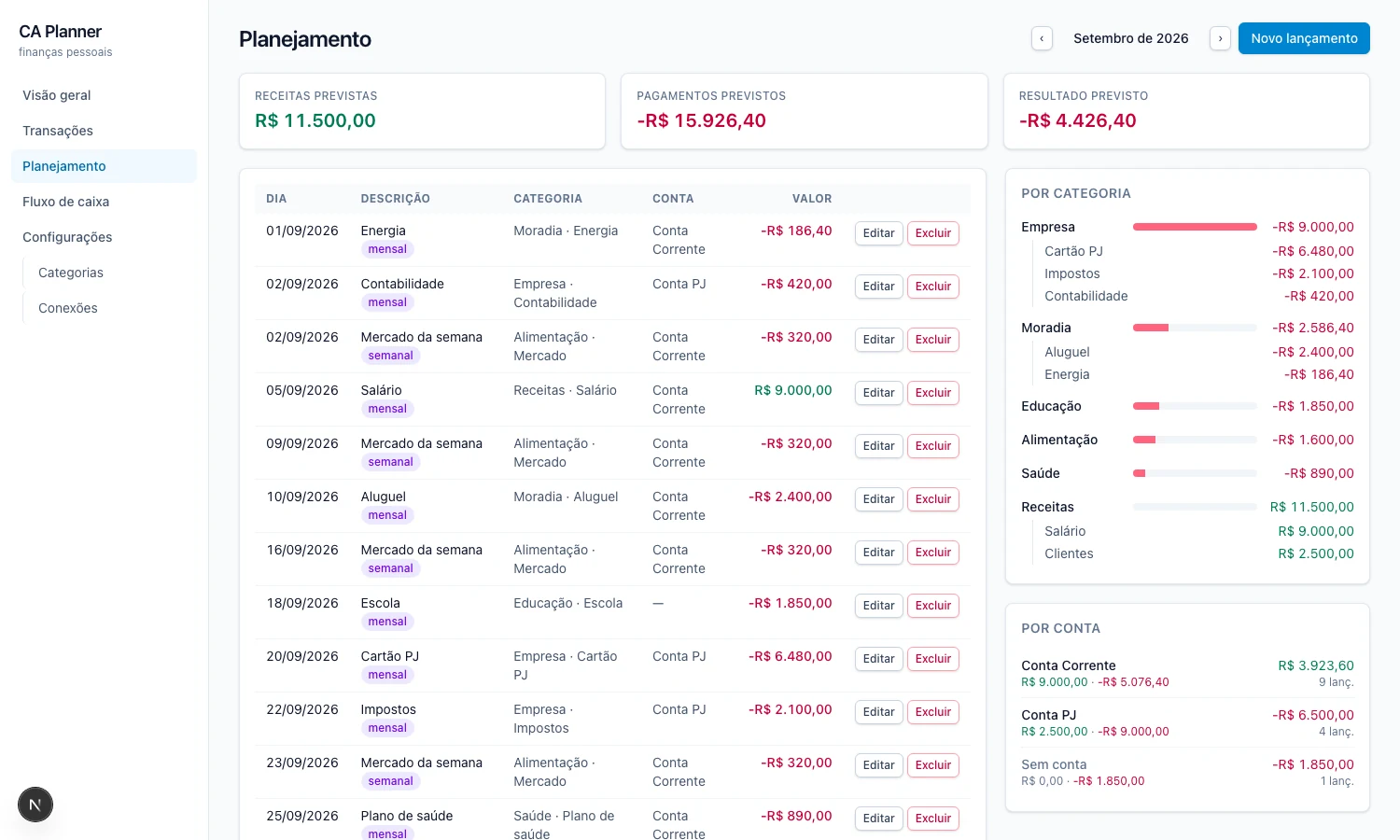
The planning page. The weekly entry appears on the 2nd, 9th, 16th, 23rd and 30th without any of those rows existing in the database. Sample data.
The balance has to come from somewhere
A projected balance needs a starting point, and the obvious one — adding up every transaction from the beginning of history — is the wrong one. It gives a number relative to zero at the start of your data, not your balance.
So the arithmetic runs backwards from the bank’s own number. Pluggy reports the current balance; the balance at the end of any earlier day is that number minus everything that moved after it. Today’s figure is therefore the bank’s figure, and filtering by category or searching changes which rows you see while changing nothing about the balance beside them — it was never a running sum of the visible rows.
Where the plan meets reality: today
Joining the two halves creates a double-counting trap. September’s rent was planned for the 10th and was actually paid on the 9th. Sum both and the month is R$ 2.400 poorer than it really is.
Since plan and transaction are not linked, nothing in the data resolves that, so the split is positional: up to today the curve is what actually happened; from tomorrow it is the plan. Items planned for earlier in the month are assumed to have happened and are left out — an assumption the page states out loud, “6 planned items dated before today (R$ 5.353,60) were left out of the projection”, rather than quietly producing a number that is off by five thousand.
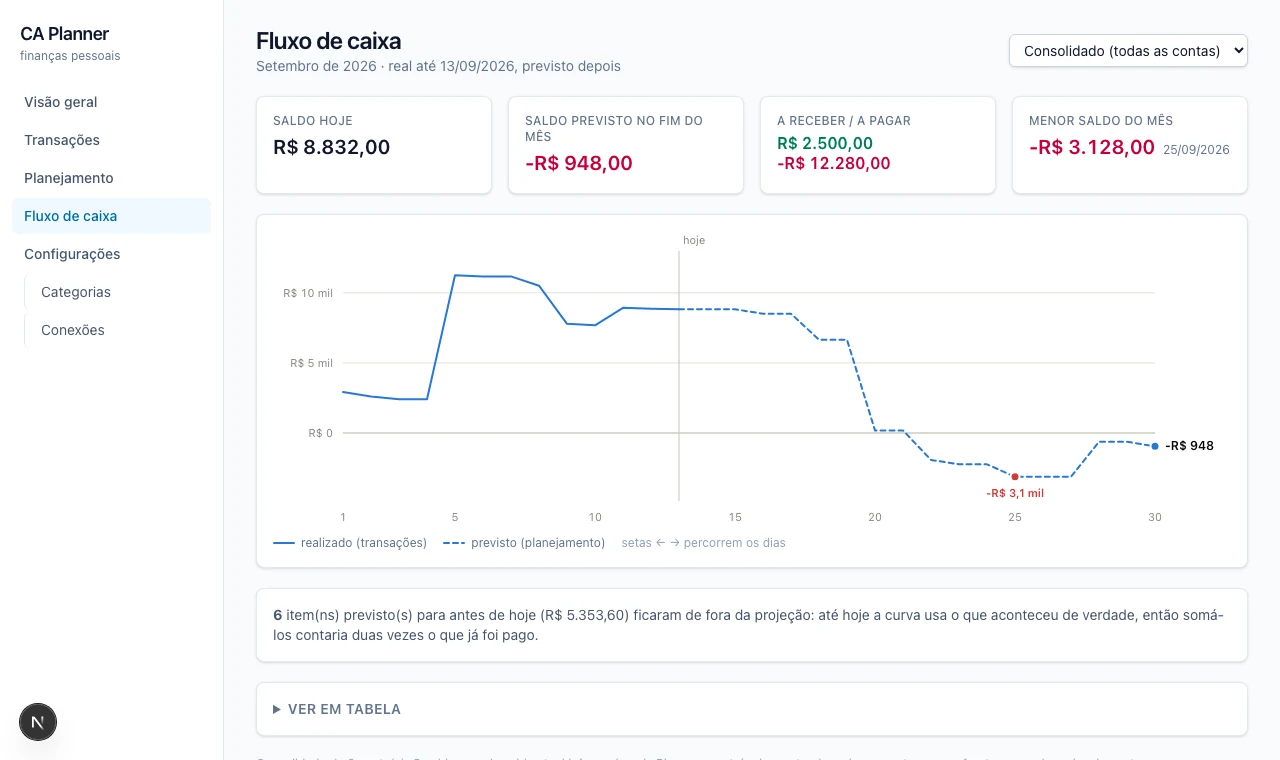
Solid to today, dashed after. The month ends at -R$ 948 and bottoms out at -R$ 3.128 on the 25th, five days before the client payment lands. Sample data.
This is the picture I wanted. Not “you are over budget” — a curve, with the day it crosses zero and the day it comes back.
That leaves the third requirement: did the planned thing happen? With no link between the two sides, the app infers one — same amount to the cent, within three days, same account when the planned entry names one. Descriptions are useless for this, and not marginally so: a bill I plan as “Cartão PJ” arrives in the statement as a Pix to a company that shares not one word with it. A guess is marked ≈, anything I link by hand is marked ✓, and a manual link to a future entry drops it from the projection, so the month never counts it twice.
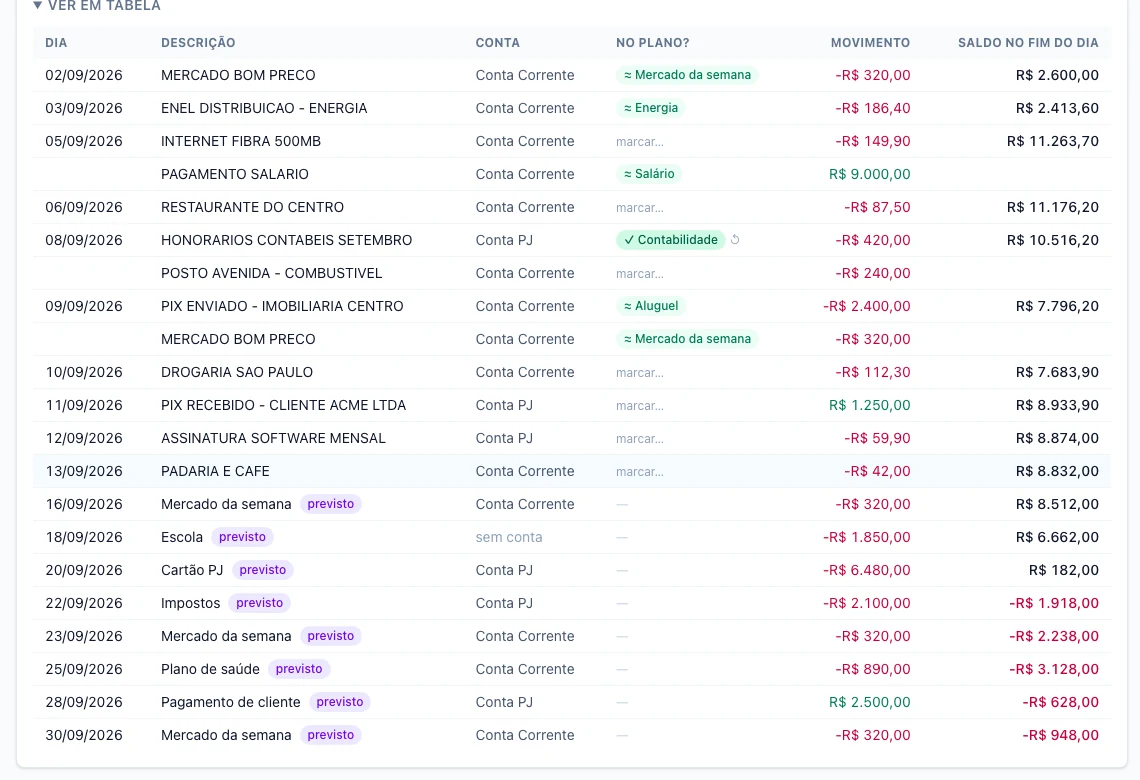
The accountant’s fee was paid six days late — outside the window, so the guess missed it and I linked it by hand (✓). Everything below the 13th is still a forecast. Sample data.
What comes next
The month view answers the question I built the app for, which makes everything after it a genuine “nice to have”: a horizon longer than one month, planned versus realized per category, the same match indicator on the transactions page, and installments as a first-class thing — “12x of R$ 420” instead of an end date I compute in my head.
The code is on GitHub as CA Planner, MIT licensed. It stores your data in a SQLite file on your machine, which is the other half of why I built it.
projects finance #personal-finance #planning #cash-flow #recurrence #open-finance #nextjs #prisma #sqlite #typescript